


For most events, one thing is enough: attendees scan a QR code and listen to the interpretation on their own phone. No receivers, no headset rental, no extra equipment. That is what the Interpretwise listener app is for, and most of the time it covers everything.
But every event is unique.
One venue already hands out IR or FM receivers. A TV channel wants every language separately so it can broadcast it. Then there is radio, a live stream, a recording for the archive, a press room that needs its own feed. A professional interpretation platform has to handle these events too, not only the simple ones.
That is where audio routing for simultaneous interpretation comes in: the floor has to reach the interpretation system, and every interpreted language has to come out on its own channel, exactly where it is expected. Get it wrong and German ends up on the French receivers, or the translation plays through the room speakers.
This article explains when you need routing, how it works, why a browser cannot do it and how to connect everything with Interpretwise Console, our free Mac app.
When the listener app is enough, and when you need routing
For a conference, a town hall or a training session where everyone has a phone, the listener app covers everything. Attendees pick their language, listen with their own earphones and read live captions, and the organiser does not hand out or collect any equipment.
Routing becomes necessary as soon as the languages have to reach equipment or channels outside the app:
- Infrared and FM receivers that the venue already owns, with one transmitter channel per language.
- Television and radio, where the broadcaster takes each language as a separate audio feed for its own channels or audio tracks.
- Streaming and other platforms, where each language goes into the production desk or encoder of a live stream or a hybrid event platform.
- Recording, with one track per language for the archive, post-production or minutes.
- Feeds inside the venue, such as the press room, a VIP area, an overflow hall or the booth monitors.
The listener app keeps working in parallel. Routing does not replace phones; it adds every other destination the event needs, from the same interpretation and at the same time.
What audio routing means in an interpretation setup
Every interpretation setup has two directions of audio.
Floor in. The sound engineer sends the floor mix, everything spoken on stage, from the mixing desk to the interpretation system. On a professional interface this arrives on one specific channel, for example input 7 of a 16-channel interface, or a channel on the Dante network.
Languages out. The interpretation system returns one audio signal per language. Each one has to land on its own channel so the equipment downstream can tell them apart: channel 1 of the infrared transmitter carries English, channel 2 German, and so on.
Between the two sits the interpretation itself. With Interpretwise it runs in the cloud, where AI and human interpreters produce every language in real time. Routing connects that cloud to the hardware around the event, so receivers, desks, broadcasters and recorders get the same languages as the phones, at the same time.
Why a browser is not enough
Most interpretation consoles run in a web browser, and for small events that works well: one USB interface, floor on channels 1 and 2, audience on their phones. On a real audio rack, a browser hits three limits.
- It only sees two input channels. Chrome captures at most two channels from an audio device. A 16-channel interface looks like a stereo microphone, so a floor feed on channel 7 is out of reach.
- It cannot address individual output channels reliably. On a device with more than two outputs, a browser may play the audio on the device and on the laptop speakers at the same time, or on the speakers only. We measured this on real Dante and multichannel devices, and it is why the Interpretwise browser console refuses multichannel devices rather than risk a language leaking into the room.
- It does not show what the device really is. You cannot see the true channel count or sample rate, so you cannot confirm the patch before the event.
This is not only a Dante problem. An ordinary USB or Thunderbolt audio interface with 8, 16 or more channels, the kind most AV teams already have in their rack, runs into exactly the same limits. In a browser, multichannel routing simply cannot be done without third-party tools.
So the usual workaround is to add them: virtual audio drivers and routing software that split the channels, a dedicated RSI box, or a chain of computers and stereo interfaces, one per language. Each one costs money, has to be configured and is one more thing that can fail on event day. Interpretwise Console removes that layer. It talks to macOS audio (Core Audio) directly, so every channel of every interface is available from one Mac.
Step 1: Check the interface and the floor channel
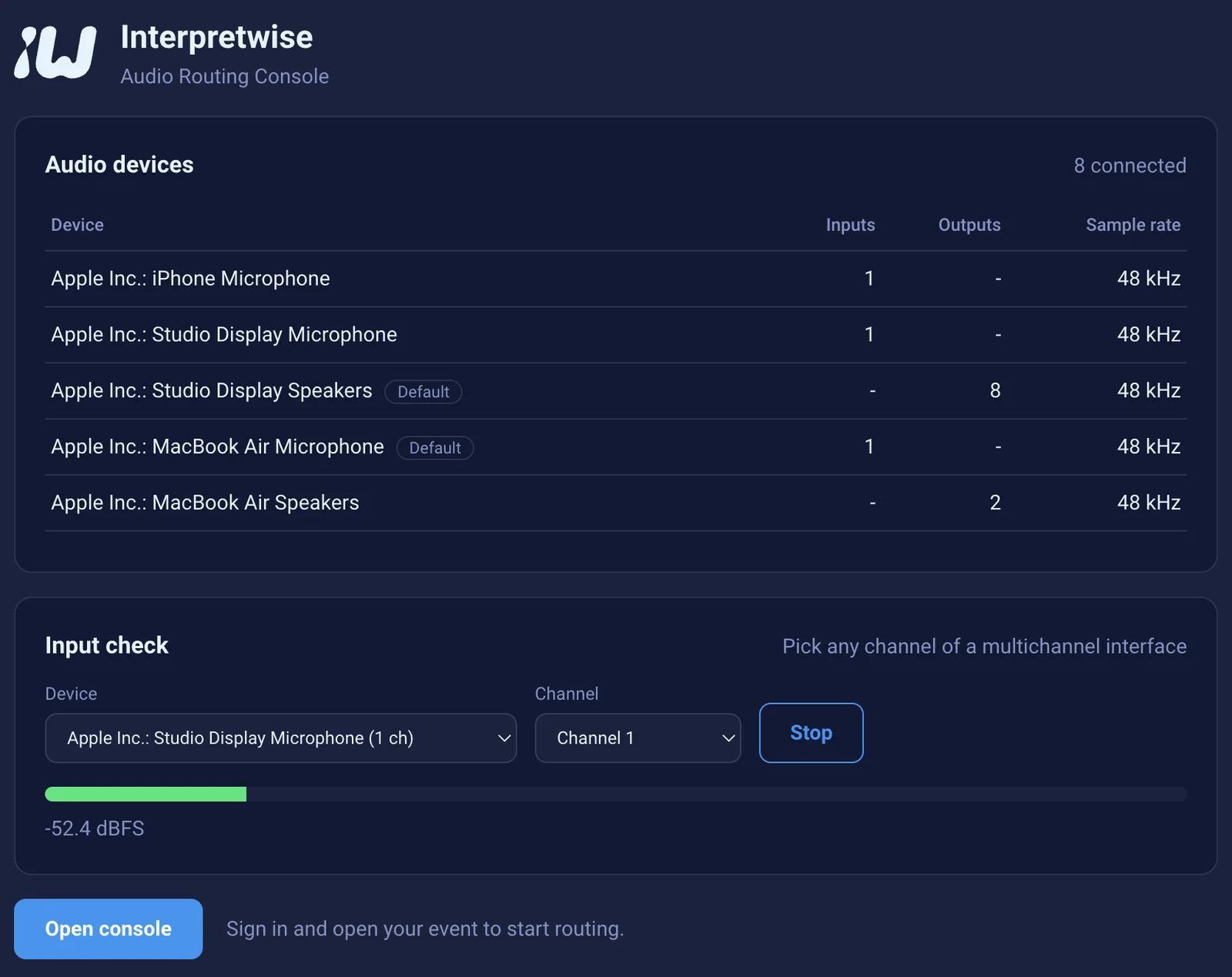
Open Interpretwise Console. Before you sign in, the start screen lists every connected audio device with its real number of inputs and outputs and its sample rate. The list updates as soon as you plug in an interface or start Dante Virtual Soundcard.
Then use the input check: pick the device and the single channel the sound engineer promised, and watch the level meter. If the meter moves when someone talks on stage, the floor is where it should be. This works offline, so you can do it during the technical rehearsal before the venue network is ready.
Step 2: Route the floor in
Sign in, open your event and go to the broadcast console. In Floor & AI Engine, choose the floor input device and then the exact channel the floor arrives on: channel 1, 7 or 15. There is no need to re-patch the desk so the floor lands on channels 1 and 2.
The same interface can be used for the floor input and the language outputs at the same time, because input and output channels are separate. A common setup is the floor on input 1 and six languages on outputs 1 to 6 of the same device.
Step 3: Route every language out to its own channel
Open the Audio/Video Routing Console. Every language in the event has its own row: choose the output device and the channel. English to channel 1, Lithuanian to channel 2, German to channel 3, French to channel 4. Each language leaves as a separate, clean signal, never as a mix.
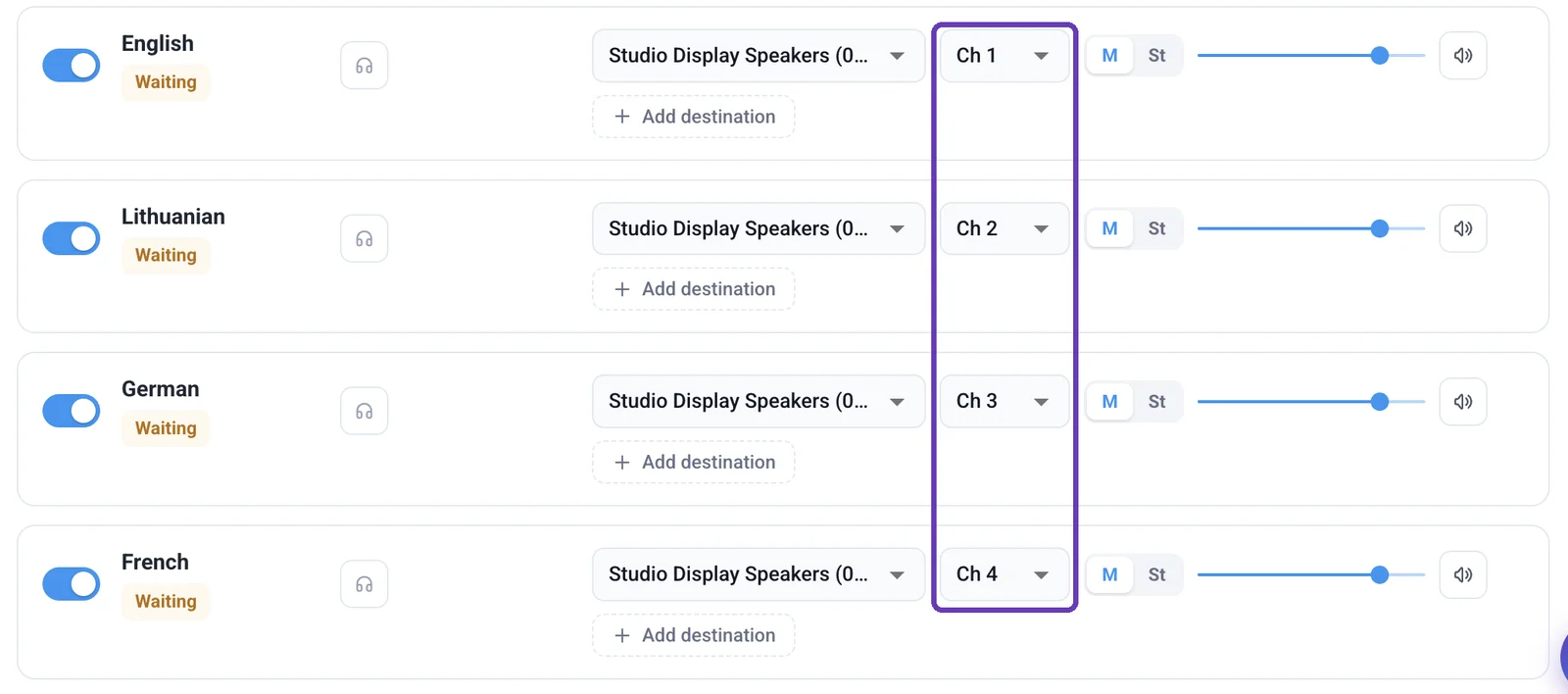
All output channels of the device are available, not only the first two. Each destination can be mono or a stereo pair, has its own level and can be muted on its own.
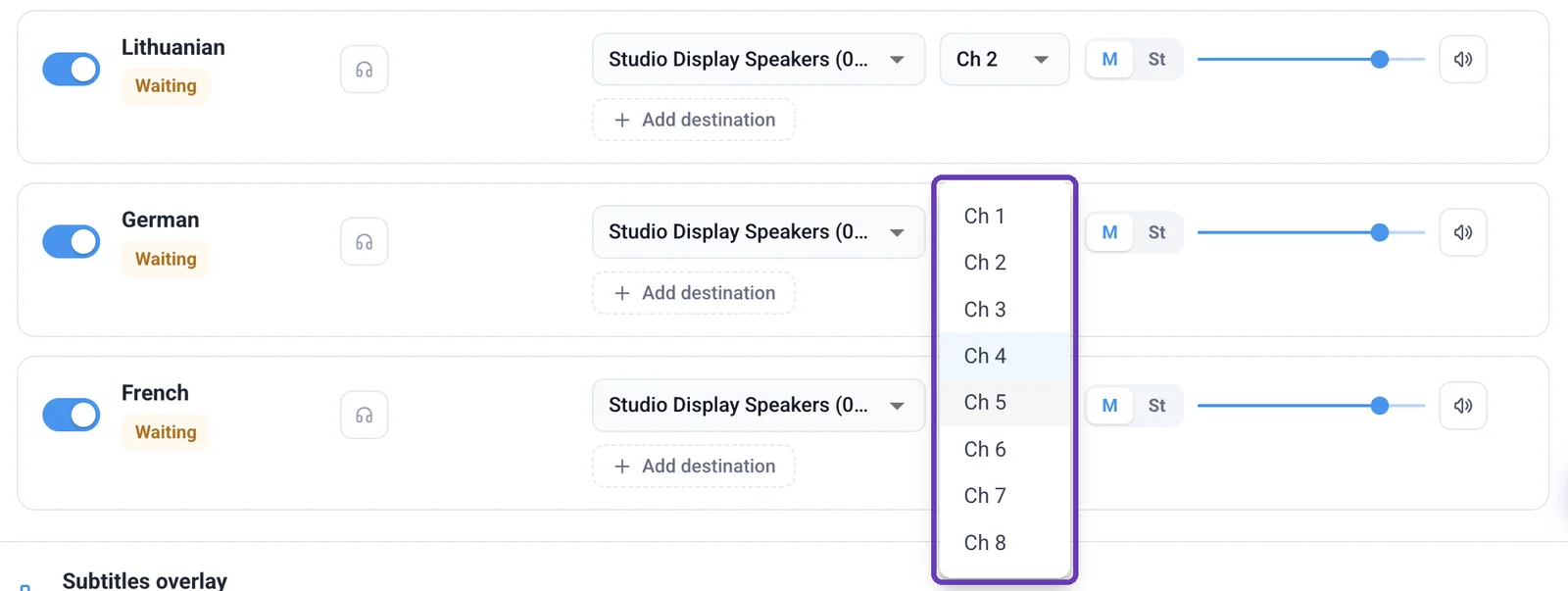
When the routing is right, save it as a preset. For a three-day conference, or a venue you work in every year, the whole patch comes back in one click.
Routing interpretation over Dante
Dante is not required: everything above works with an ordinary multichannel audio interface. But if the venue runs a Dante network, routing from one Mac pays off even more. Dante Virtual Soundcard, or a Dante interface connected to the Mac, appears in macOS as an ordinary multichannel audio device, so Interpretwise Console can address every one of its channels.
- Start Dante Virtual Soundcard and set it to 48 kHz, the sample rate the Interpretwise pipeline uses.
- In the broadcast console, choose the Dante device as the floor input and pick the Dante channel the engineer sends the floor to.
- In the routing console, give every language its own Dante channel.
- In Dante Controller, subscribe those channels to wherever they need to go: the transmitter rack, the FOH desk, a broadcast truck, a recorder or the booth monitors.
One network cable now carries the floor in and every language out. There are no converters or analogue interfaces between Interpretwise and the venue system, and the distribution system treats each language like any other Dante source.
Feeding infrared and FM receivers
Many venues already own infrared (IR) or FM interpretation systems. Their transmitters take one audio input per language channel, so the routing is simple: connect each output channel of the interface, or each Dante channel, to the matching transmitter input, and send the floor language to the transmitter's floor channel.
Set the level of each destination to match the transmitter's input sensitivity, then walk the room with a receiver and check every channel before doors open. Phone listening keeps working at the same time, so you can hand out receivers to the front rows and let everyone else listen on their own phone.
Sending one language to several places
Real events rarely need a language in only one place. With Add destination, the same language can go to the IR transmitter, a channel on the mixing desk for the live stream and a track on the multitrack recorder, each with its own level. You do not need a splitter or a second interface for it.
A routing checklist before doors open
- The interface or Dante Virtual Soundcard shows the expected channel count at 48 kHz.
- The input check shows the floor moving on the agreed channel.
- Every language has its own output channel and the channel numbers match the transmitter or desk patch sheet.
- Levels are set per destination and nothing is muted by mistake.
- A short test broadcast has been heard on a receiver for every channel.
- The routing is saved as a preset for the next session.
Frequently asked questions
Do I need audio routing for every event?
No. Most events only need the Interpretwise listener app: attendees scan a QR code and listen on their phones. Routing is for events where the languages also have to reach infrared or FM receivers, television, radio, a streaming platform, a recorder or other equipment.
Do I need Dante for multichannel routing?
No. An ordinary USB or Thunderbolt audio interface with 8, 16 or more channels works the same way: the floor comes in on any input and each language goes out on its own output. Dante is useful when the venue already distributes audio over the network.
Can I route simultaneous interpretation to Dante without extra hardware?
Yes. Run Dante Virtual Soundcard on a Mac with Interpretwise Console, route each language to its own Dante channel and subscribe the channels in Dante Controller. No RSI box or converter is needed.
Why can a browser not use channel 7 of my audio interface?
Browsers capture at most two channels from an audio device and cannot reliably play to individual channels of a multichannel device, so without third-party tools the other channels are out of reach. A native app such as Interpretwise Console talks to macOS audio directly and sees every channel.
How many languages can I route?
As many as your event has and your interface or Dante setup has output channels. Each language takes one channel, or two if you send it in stereo.
Can infrared receivers and phones be used at the same event?
Yes. Routing is added on top of phone listening. The same languages go to the transmitter and to attendees' phones at the same time.
Do I need a Mac?
For multichannel and Dante routing, yes: Interpretwise Console is a free Mac app on the Mac App Store. For a single stereo interface, the browser console is enough.
Does routing change the interpretation delay?
No. The interpretation runs in the Interpretwise cloud exactly as before. Routing only changes where the audio goes when it reaches your Mac.
Good routing is invisible: every listener hears the right language on the right channel, and nobody in the room hears a translation they did not ask for. If you work with Dante, infrared systems or multichannel interfaces, download Interpretwise Console free on the Mac App Store, read the full signal flow in our AV integration guide, or contact us to plan the routing for your next event.
Related Articles
Conference Interpretation Cost: A Complete 2026 Pricing Breakdown
Hybrid Event Interpretation: A Complete Technical & Logistics Guide
The True Cost of Interpretation Booths (And How to Cut It by 80%)
The Ultimate Technical Guide to Audio Setup for Remote Simultaneous Interpretation

How to Integrate Browser-Based Interpretation Into Your Event Tech Stack